
vue组件系列之一言
在进行网页开发时,您是否觉得页面没有活力,您是否觉得缺少人文关怀? 于是,让页面得到些许生机的组件——“一言”应运而生
基础内容
组件内容
相信大家在本博客首页都看到了“motto”这个小组件这里再次放送(😋
相关信息
本组件使用的api为https://v1.hitokoto.cn
它的代码如下
<script setup lang="ts">
import { ref, onMounted } from "vue";

const phrase = ref('正在加载一言...')

const fetchPhrase = async () => {
  try {
    const response = await fetch('https://v1.hitokoto.cn?c=d&encode=json')
    const data = await response.json()
    phrase.value = data.hitokoto || '今日箴言'
  } catch (error) {
    console.error('一言获取失败:', error)
    phrase.value = '旅途的意义在于过程而非终点'
  }
}

async function copyText() {
  try {
    await navigator.clipboard.writeText(phrase.value);
    alert('已复制到剪切板')
  } catch (err) {
    console.error('复制失败:', err);
    const textArea = document.createElement('textarea');
    textArea.value = phrase.value;
    document.body.appendChild(textArea);
    textArea.select();
    document.execCommand('copy');
    document.body.removeChild(textArea);
    alert('复制失败')
  }
}

onMounted(() => {
  fetchPhrase()
})
</script>

<template>
  <span @click="copyText()">
    {{ phrase }}
  </span>
</template>
组件工作流程
- 组件加载时,调用
fetchPhrase从api函数获取一言 - 一言获取成功后,将其赋值给
phrase变量 - 组件渲染时,将
phrase变量显示在页面上 - 点击句子时,调用
copyText函数将句子复制到剪切板,并调用alert函数提示用户复制情况
使用方法
普通vue项目中
很简单,只需要在vue文件中引入组件
示例:
<template>
  <div>
    <Hitokoto />
  </div>
</template>

<script setup lang="ts">
import Hitokoto from '~/Hitokoto.vue'
</script>在vuepress-theme-plume中使用
相关信息
由于官方文档没有明确说明如何插入自定义组件(也可能是我没看到😗),于是我参照官方给出的Repo卡片示例作本章节教程
- 在
~/.vuepress/xxx目录下创建Hitokoto.vue文件
例如:
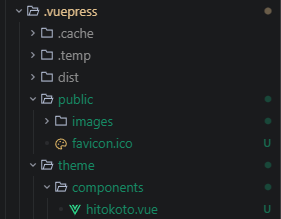
- 在
~/.vuepress/client.js文件中添加组件并声明全局组件
例如:
import { defineClientConfig } from 'vuepress/client'
// import CustomComponent from './theme/components/Custom.vue'
import Hitokoto from './theme/components/hitokoto.vue'
// import './theme/styles/custom.css'

export default defineClientConfig({
  enhance({ app }) {
    // your custom components
    // app.component('CustomComponent', CustomComponent)
    app.component('Hitokoto', Hitokoto)
  },
})- 在md文件中直接使用
如:
## 今日箴言

<Card
    title="今日箴言(单击句子以复制)"
    icon="material-symbols:voice-chat-rounded">
  <Hitokoto />
</Card>
相关信息
其中,<Hitokoto />是我们自定义的组件,<Card />是vuepress-theme-plume提供的组件
本文到此结束,希望对您有所帮助
提示
本文讲到的在vuepress-theme-plume中使用自定义组件的方法,以后的文章中可能会用到,到时将不再赘述😜